
What Is a Tech Pack? A Fashion Designer's Guide (2026)
You finished the design. The sketch looks right. Then the sample arrives with the wrong pocket, a different zip, and a hem you never asked for. That is rarely a design problem. It is a tech pack problem: a detail was missing, so the factory guessed.
A tech pack is the document that tells a factory exactly how to make your garment. This guide walks you through every section, what to write in each one, and how to save time doing it, so your first sample lands closer to what you drew.
What Is a Tech Pack?
A tech pack (short for technical package) is a document that tells a factory how to make one garment style. It puts your flat sketches, materials, measurements, stitching details and labels in one place. It is also called a spec sheet or technical pack.
More than one person reads it. The sampling team builds from it, the pattern maker cuts from it, the costing team prices from it, and quality checks bulk production against it. Every sample that comes back is measured against what your tech pack says.
Prefer a shorter version? Streamoid's how to create a tech pack guide covers the basics. This article goes deeper on each section.
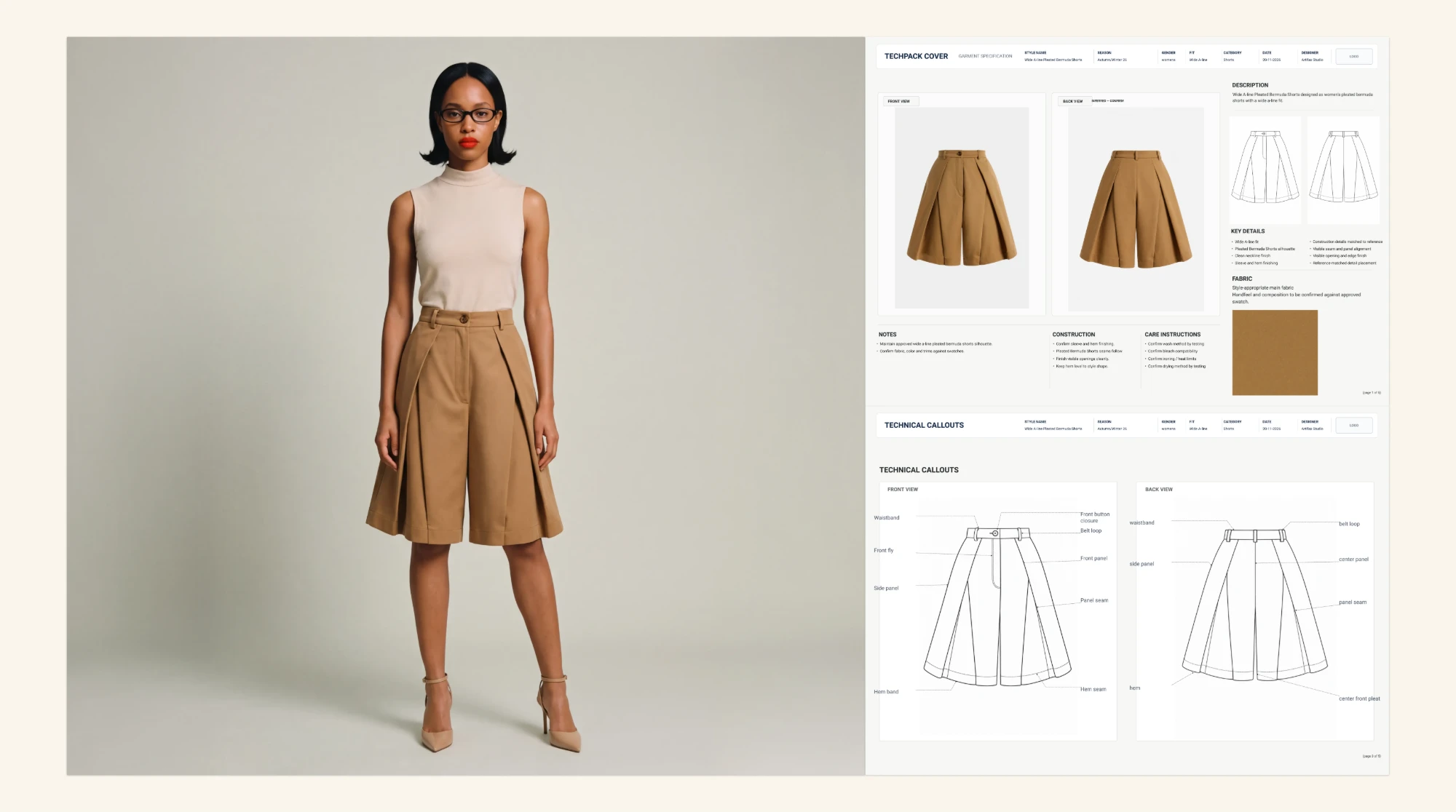
How to Build a Tech Pack: 8 Sections
Most tech packs follow the same order. Work through them from top to bottom.
1. Start With the Cover Page
Give the factory the basics before any detail: which style this is and which version they are reading. Include:
- Style name and code
- Season and size range
- Colorways: every color you are producing
- Version number and date: update both each time you change the pack
- Your contact: who answers questions
Tip: the version number matters more than it looks. If the pack gets emailed back and forth, it is the only way the factory knows which one is current.
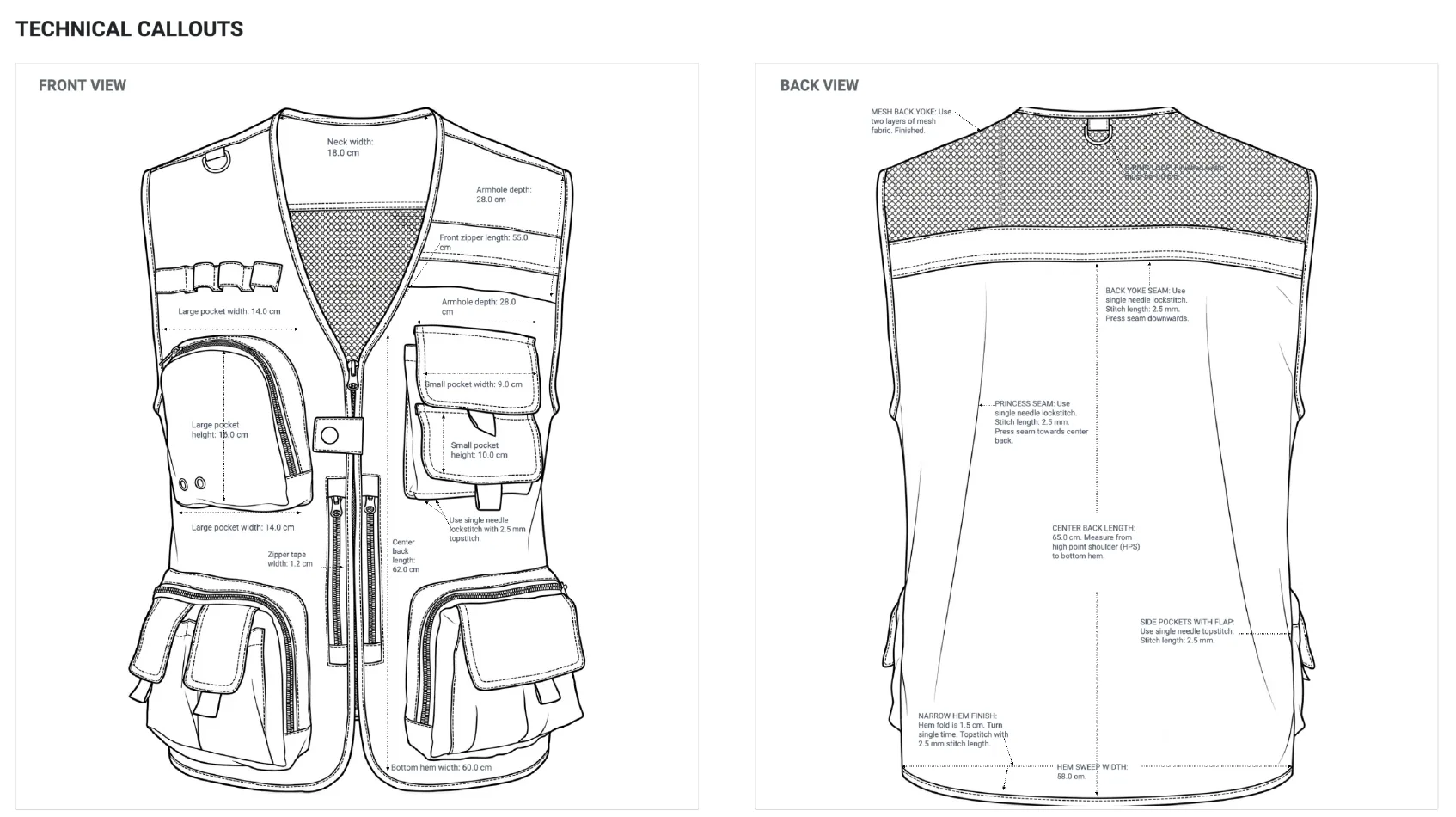
2. Draw Your Technical Flats
A technical flat is a clean, flat line drawing of the garment. It is not a fashion illustration. It shows seams, panels, pockets and closures, so the factory can see the structure at a glance. Include:
- Front and back views, plus side views if the shape needs them
- Zoomed detail views for collars, pockets, cuffs and hems
- Callouts: arrows that point to the notes explaining each detail
In Artifax, your tech pack stays connected to the moodboard and design concept it came from.
3. Build the Bill of Materials (BOM)
The BOM lists every material that goes into the garment. Factories use it to source materials and to price your style. Include:
- Main fabric: fiber content, weight, width and color reference
- Trims: buttons, zips, thread, interlining, elastic, drawcords
- Labels: brand, size and care labels
- Placement and quantity: where each item goes and how many you need per garment
Tip: check the BOM against your flat. If the flat shows a hidden zip, the BOM should not list a metal exposed zip.

4. Add Measurements and Tolerances
The measurement sheet tells the factory how big each part of the garment should be. Each measurement is called a point of measure (POM). Include:
- Base size: say which size the numbers belong to
- Points of measure: for example chest width, body length, sleeve length and hem opening
- Grading rules: how the numbers change from size to size
- Tolerance: how much each measurement is allowed to vary in bulk production
Agree tolerances with your factory. Without them, nobody can say whether a sample passes or fails.
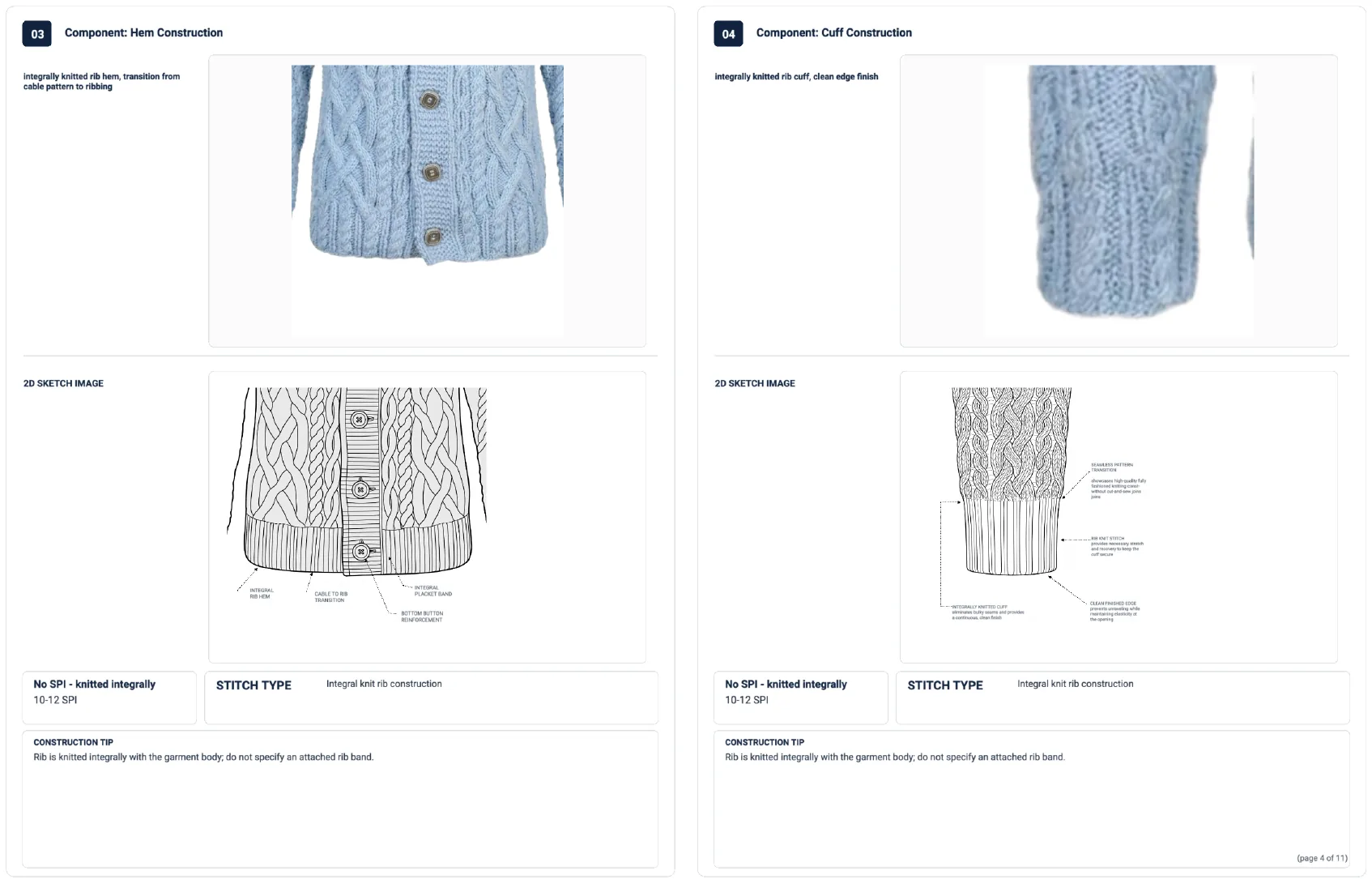
5. Write the Construction Details
This section decides how the garment is made, so it also decides how it feels and how long it lasts. If a method matters to you, write it down. If you leave it out, the factory uses its own standard. Include:
- Stitch types and seam types: for example flatlock or overlock
- Seam allowances
- Topstitching: distance from the edge and stitches per inch
- Finishing: hems, facings, pocket construction and interlining
Here is the difference between vague and specific (the values are examples). Vague: "Topstitch collar." Specific: "Topstitch collar 0.6 cm from edge, 12 stitches per inch, thread matched to body fabric, backstitch at both ends."
6. Specify Colors, Prints and Artwork
Every color needs a reference the factory can match, usually a Pantone code or a physical swatch. "Navy" means something different at every mill. Include:
- Color reference for each colorway
- Artwork files for prints, embroidery and labels
- Placement and size for each element, measured from a fixed point such as the shoulder seam or center front
- Colors used in each print or embroidery
7. Add Labels and Packaging
Labels and packaging are easy to forget and expensive to fix after production. Say where each one goes and how it is attached. Include:
- Label placement: brand, size and care labels
- Hangtags and barcodes
- Folding and polybag instructions
- Carton requirements
Check the labeling rules for the market you ship to before the pack is final.

8. Set Quality Standards and Approvals
This last section sets the bar the factory is checked against. Include:
- Defect classes: what counts as minor, major or critical
- Color matching standard
- Wash and fit tests you require
- Approval log and revision history: who signed off each sample, and what changed between rounds
The 7 Tech Pack Mistakes That Cause Extra Sampling Rounds
Most first tech packs go wrong in the same ways:
- Vague construction notes: the factory fills the blanks with its own defaults.
- No tolerances: a measurement with no tolerance cannot be judged right or wrong.
- No base size: the numbers exist, but nobody knows which size they belong to.
- A BOM that disagrees with the flats: one shows a hidden zip, the other lists an exposed one.
- Colors with no reference: "navy" is not a color specification.
- Missing label and trim positions: they get placed wherever is easiest.
- Old versions in circulation: the factory builds from last week's file.
Each one leads to the same result: another sampling round, more time and more cost.
How to Automate and Simplify Your Tech Packs
Most of a tech pack is repeat work. A shirt needs the same page layout, similar measurement points and the same label placements every time. Digital tech pack tools let you save these as templates, so you only fill in what changes from style to style. They also keep your flats, BOM and measurements in one record, so when you change a number it updates everywhere and the factory always sees the current version.
AI can go a step further by drafting a first version from your design, so you review and edit instead of starting from a blank page. Artifax helps you move from a design concept to a manufacturer-ready tech pack faster, with the structure built in. You still make every decision about the garment. The tool handles the formatting.
Check Before You Send It
Run through this list before the pack goes to the factory:
- The cover page shows the current version and date.
- The flats show front, back and every detail that needs a close-up.
- The BOM covers every fabric and trim, with placement.
- Every point of measure has a base-size value and a tolerance.
- Construction notes cover stitches, seams and finishing for each key area.
- Every colorway has a color reference.
- Labels, trims and packaging are described and drawn.
- Quality standards and approval steps are stated.
- Someone who did not make the pack has read it from start to finish. A fresh reader spots the gaps you stopped seeing.
Want to build tech packs faster? See how Artifax works.